
A code workspace
Models are Python scripts with CadQuery. Your coding agent runs in the built-in terminal, the editor shows what it writes, and Git keeps every version.
Open-source AI CAD
Tell your agent what you need. It writes the model as Python code with CadQuery, SOMA builds it and shows the result. Measure it, point at what is wrong, and the agent changes the code.
A CAD program where the AI does the CAD.
You are the designer: you decide what to build, check the result and point at what is wrong. The agent turns it into precise, editable geometry. SOMA brings together the three parts this needs:
Models are Python scripts with CadQuery. Your coding agent runs in the built-in terminal, the editor shows what it writes, and Git keeps every version.
SOMA builds the model on every change and shows it. Measure, cut, explode and mark it up to show the agent what to change.
Rules, skills and a command line tool teach the agent how to model, check and export, for 3D printing, CNC, sheet metal and more.
Frame from 2040 and 2080 aluminium extrusions, MGN12 linear rails and T8 lead screws on all axes, NEMA 23 steppers and a trim router spindle. Work area 300 × 300 × 80 mm.
A 3D printed organizer with a hinged lid and finger scoops. The grid of compartments is a parameter: change it and the whole box follows, including dividers and hinge.
Four legs with three joints each, driven by brushless motors with a 6:1 planetary gear. The trot comes from inverse kinematics in the animation script; the floor runs underneath.
An oak board on two steel brackets with a load of 50 kg spread over the top. CalculiX computes stress and deflection; the colors show where the shelf carries the load.
A 45 cm³ chainsaw with the whole two-stroke engine modeled inside: crankshaft, connecting rod on needle bearings, piston with rings, a cylinder whose ports follow the port timing, diaphragm carburetor, flywheel ignition and centrifugal clutch. Switch to Engine cut open to look inside.
A 3D printed desk enclosure for a sensor logger with a 2.8" touch display (ESP32-S3), battery, four GX12 sensor ports and three button plungers. Three parts printable without supports, with a recessed display and a guide that keeps the SD card from falling inside. Started as an existing CadQuery project, opened as a folder in SOMA.
A Scandinavian-style sideboard, 1800 × 450 × 800 mm, from 19 mm chipboard with two doors, three drawers on full-extension slides and tapered oak legs. From one prompt the agent also made the manufacturing drawings and a cutting list (in German, as asked).
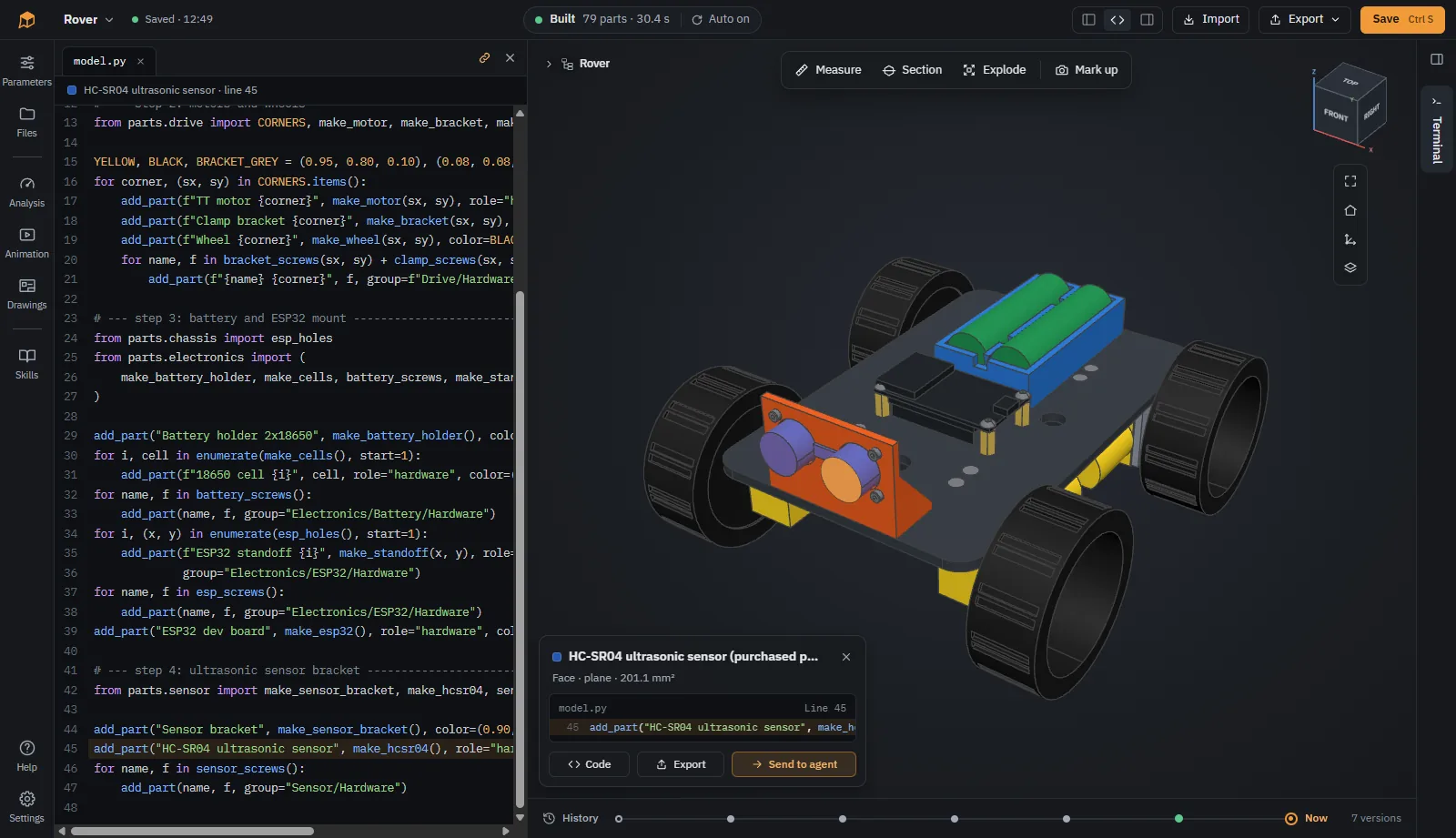
Your agent writes the model as Python with CadQuery. SOMA rebuilds it on every change, and the code is always there if you want to change a dimension yourself.
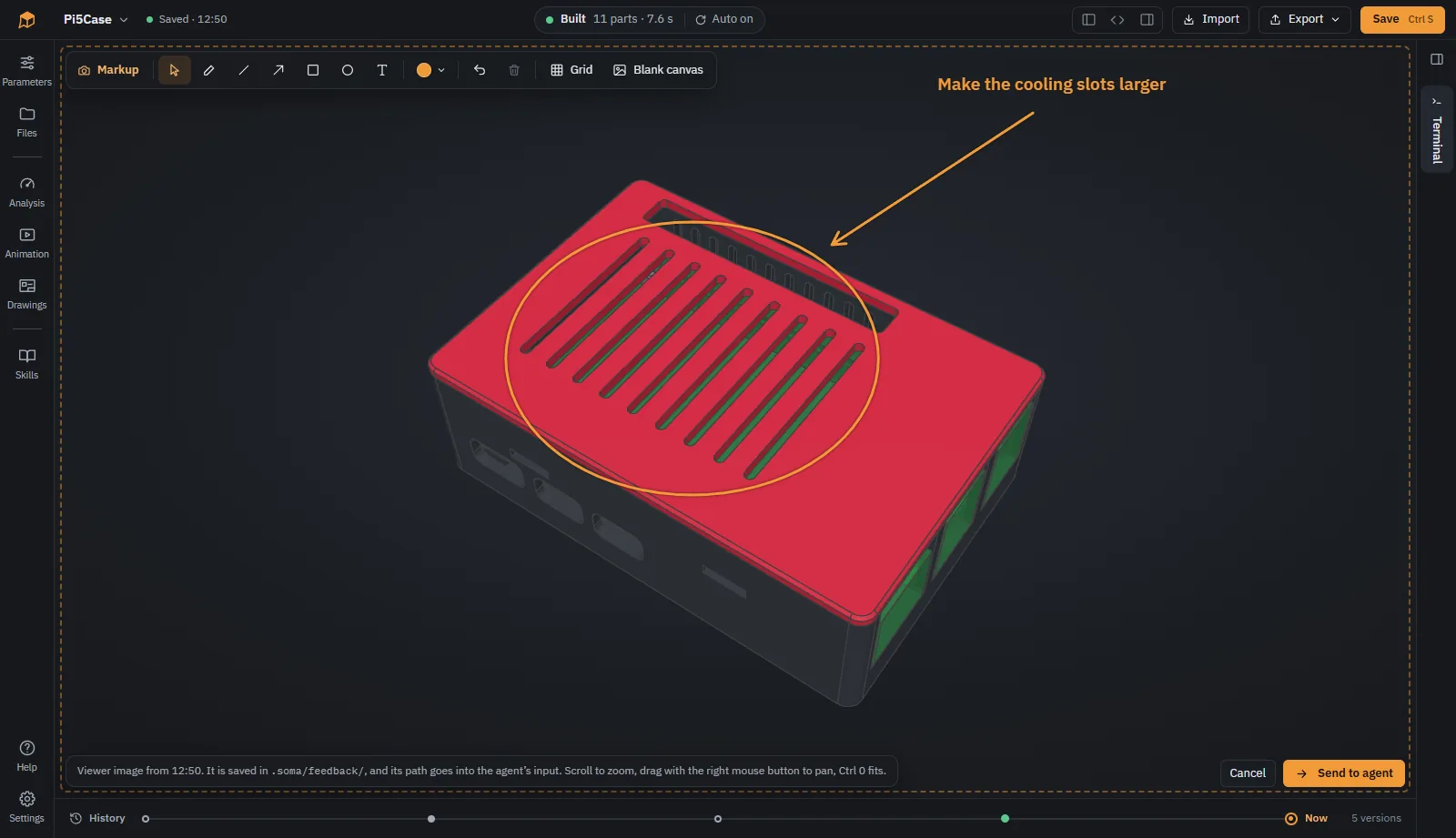
Draw arrows, circles and notes on a picture of the view and send it to the agent. Or click a part and send it, so the agent knows exactly what you mean.
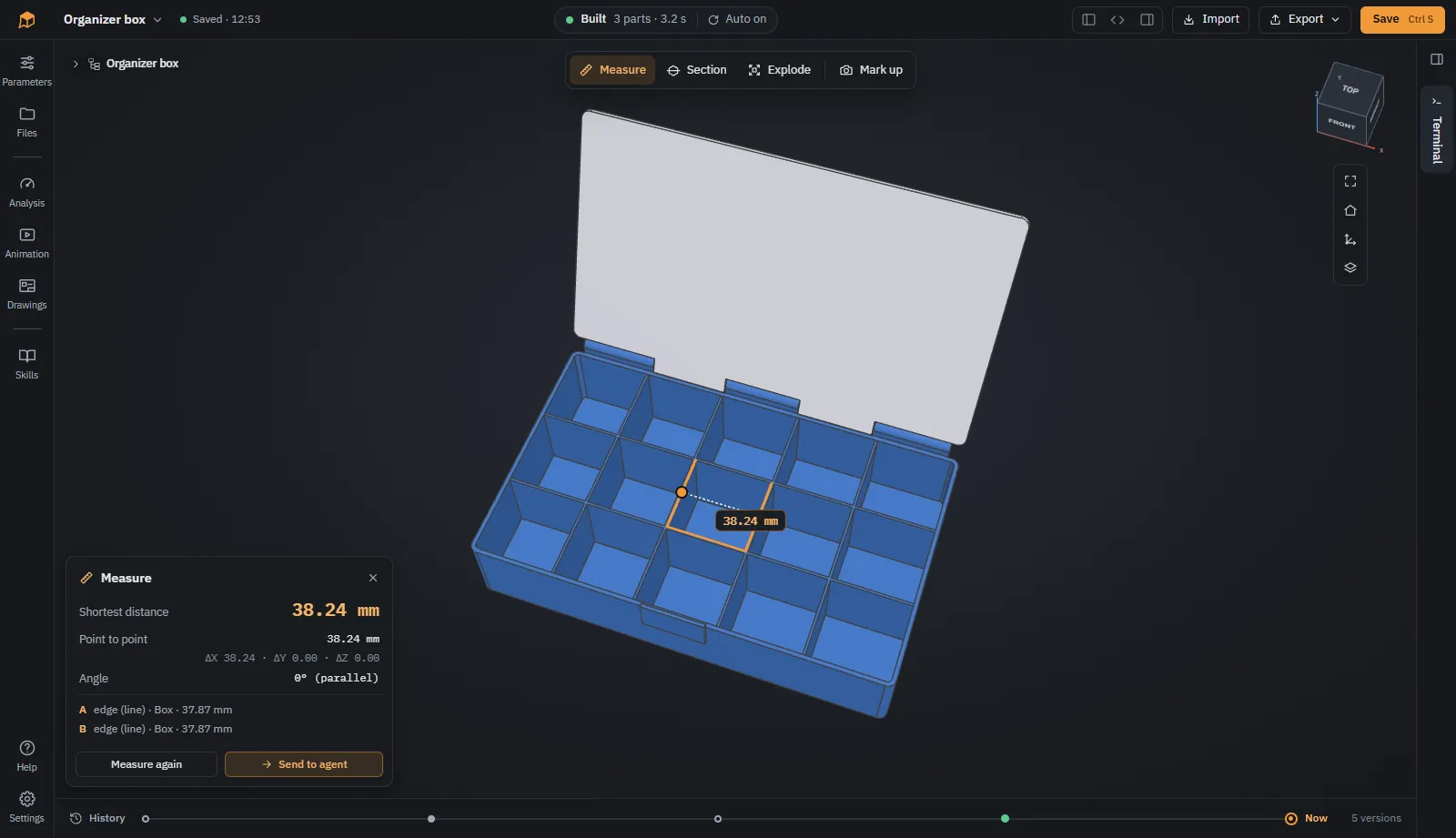
Click a face or edge for its size, a second one for distance and angle. The values are exact, taken from the CAD geometry, not from the mesh.
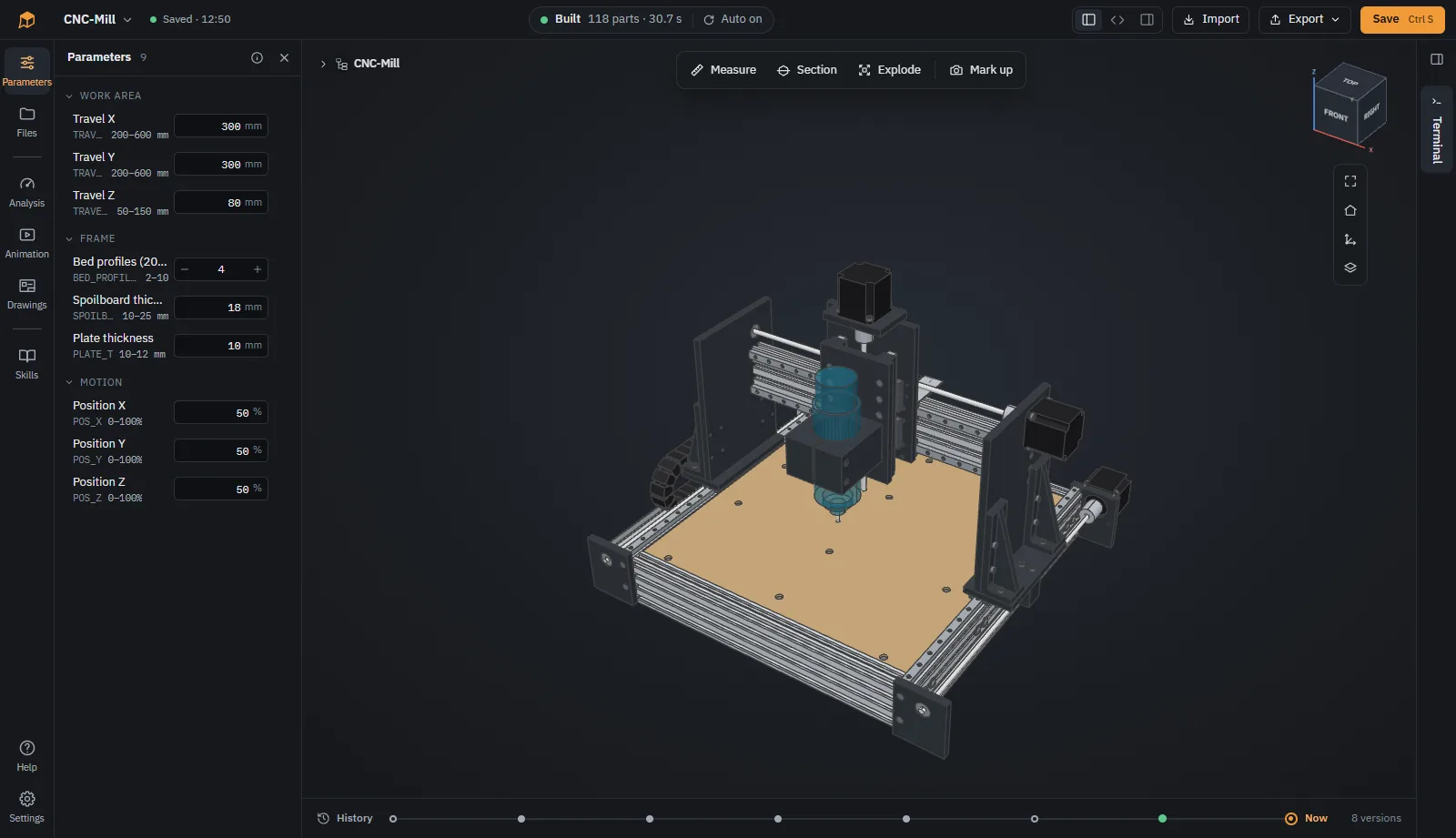
Change the values the agent made adjustable, such as wall thickness or work area, without touching the code. The model rebuilds right away.
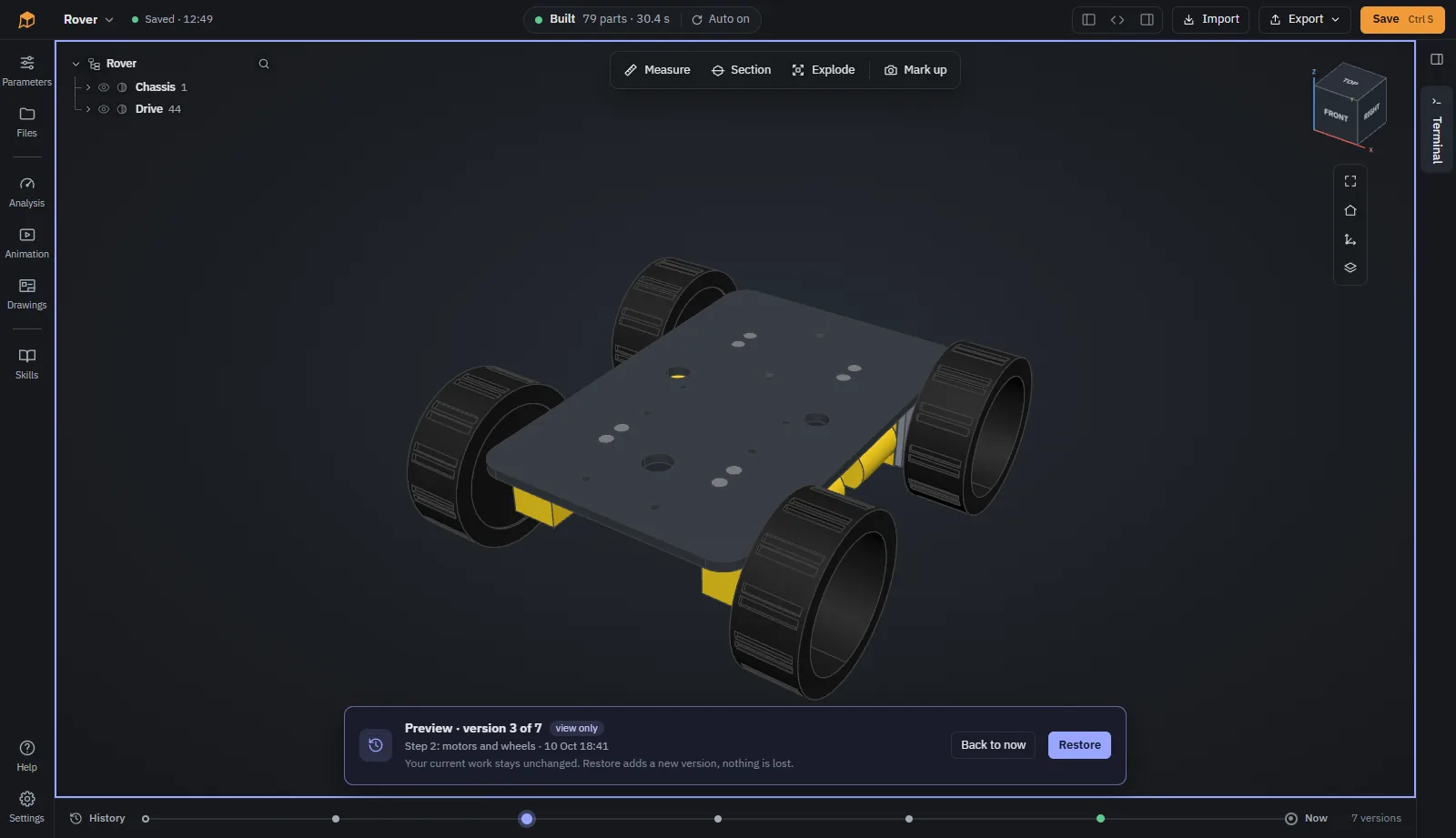
Every step of the agent lands on a timeline. Preview earlier versions and restore the one you want to continue from.
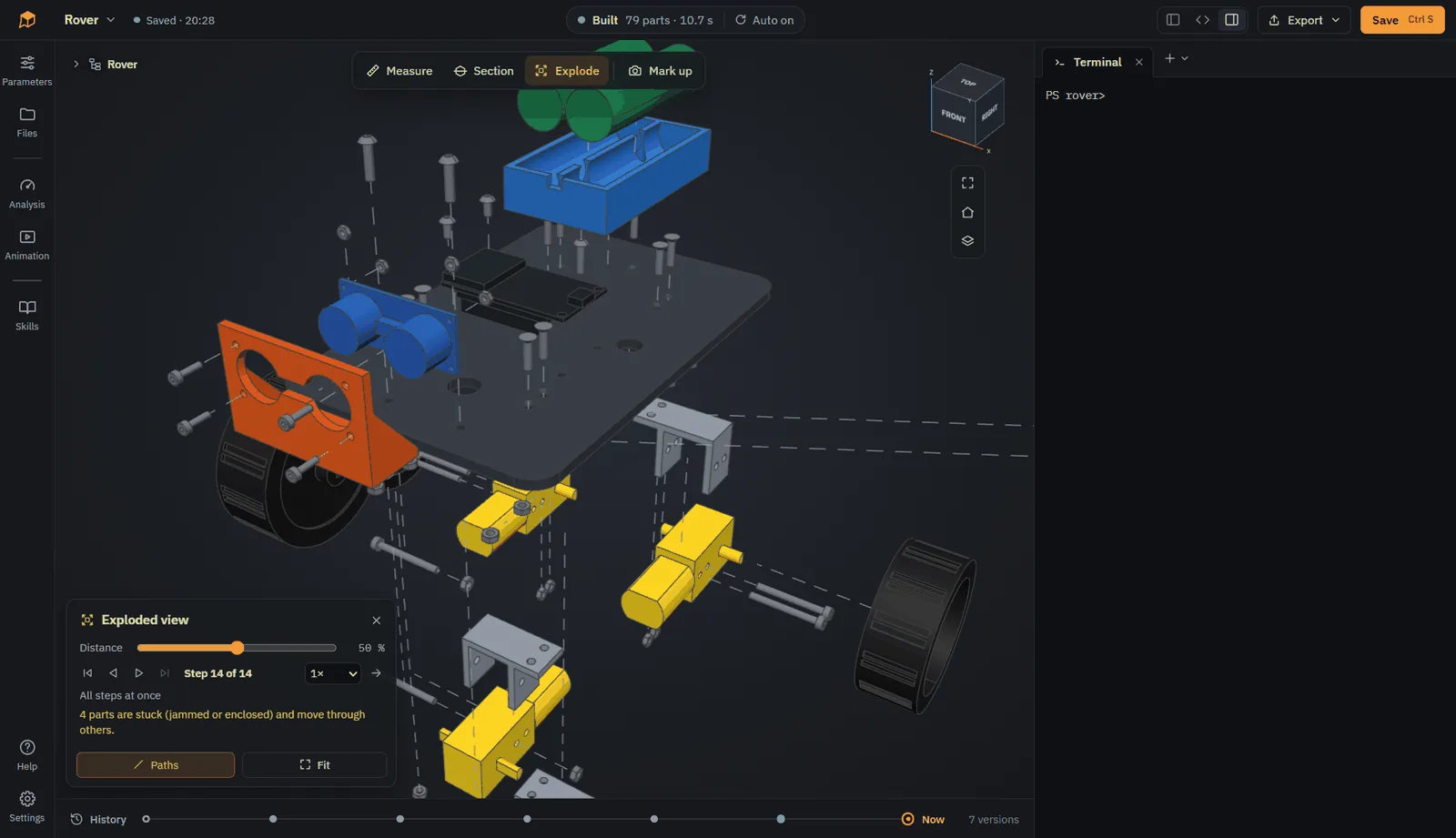
Take an assembly apart with one slider. SOMA works out in which direction each part comes off.
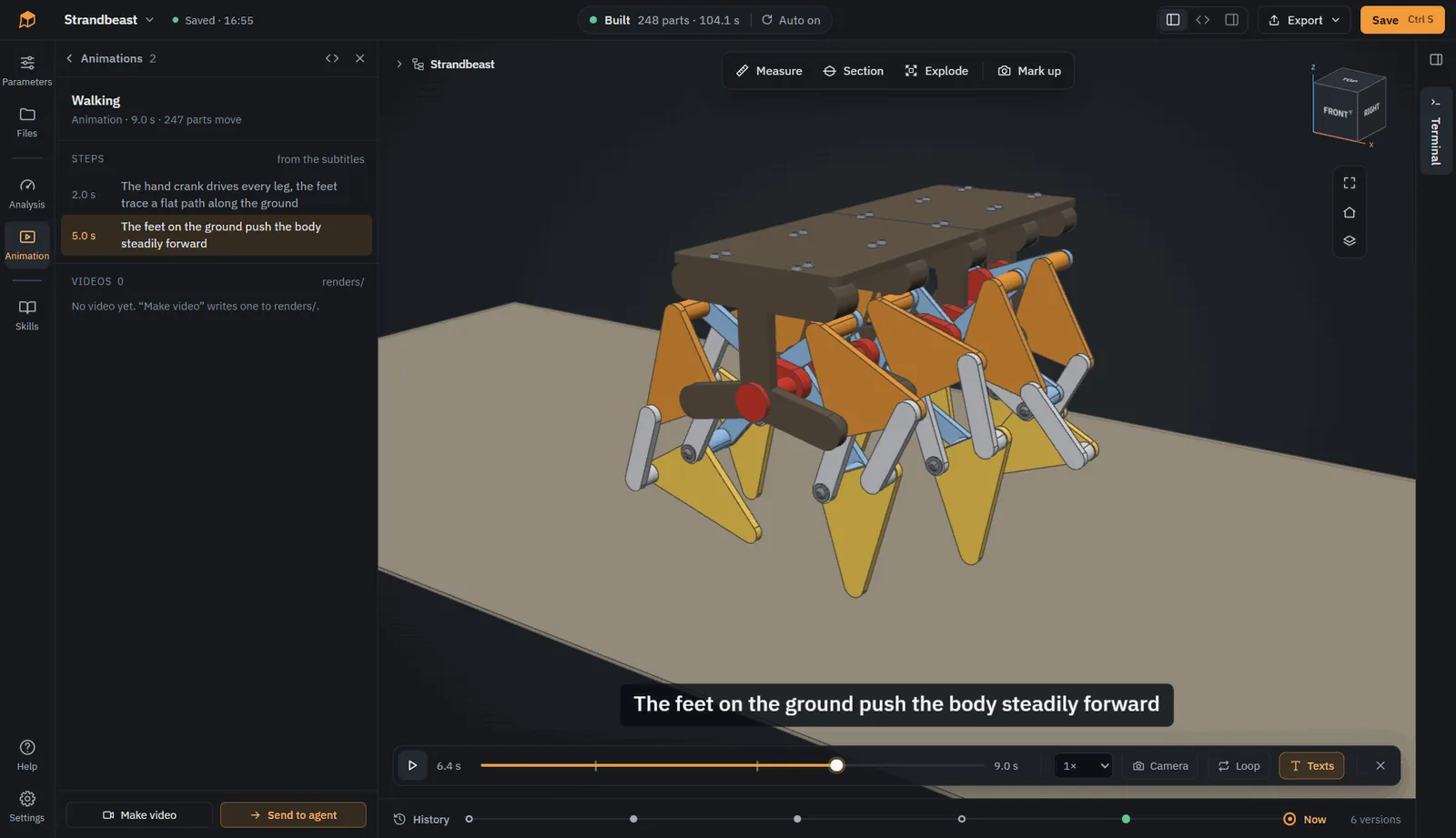
Your agent describes motion in Python: joints, gears, camera moves. Play it in the viewer, check for collisions, and render it to video.
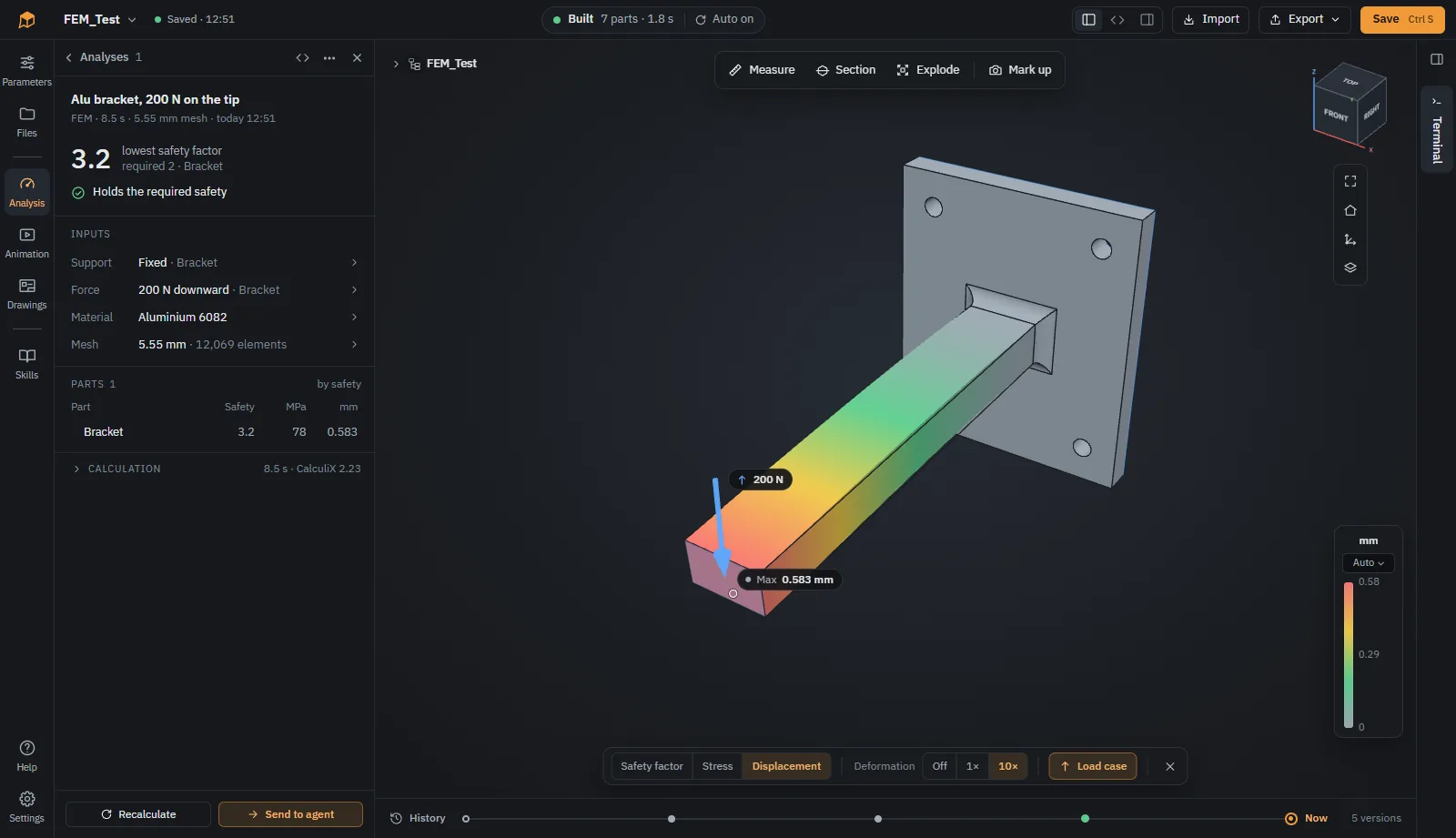
Check overhangs and wall thickness for printing, and strength with finite elements using CalculiX. Results are shown in color on the model.
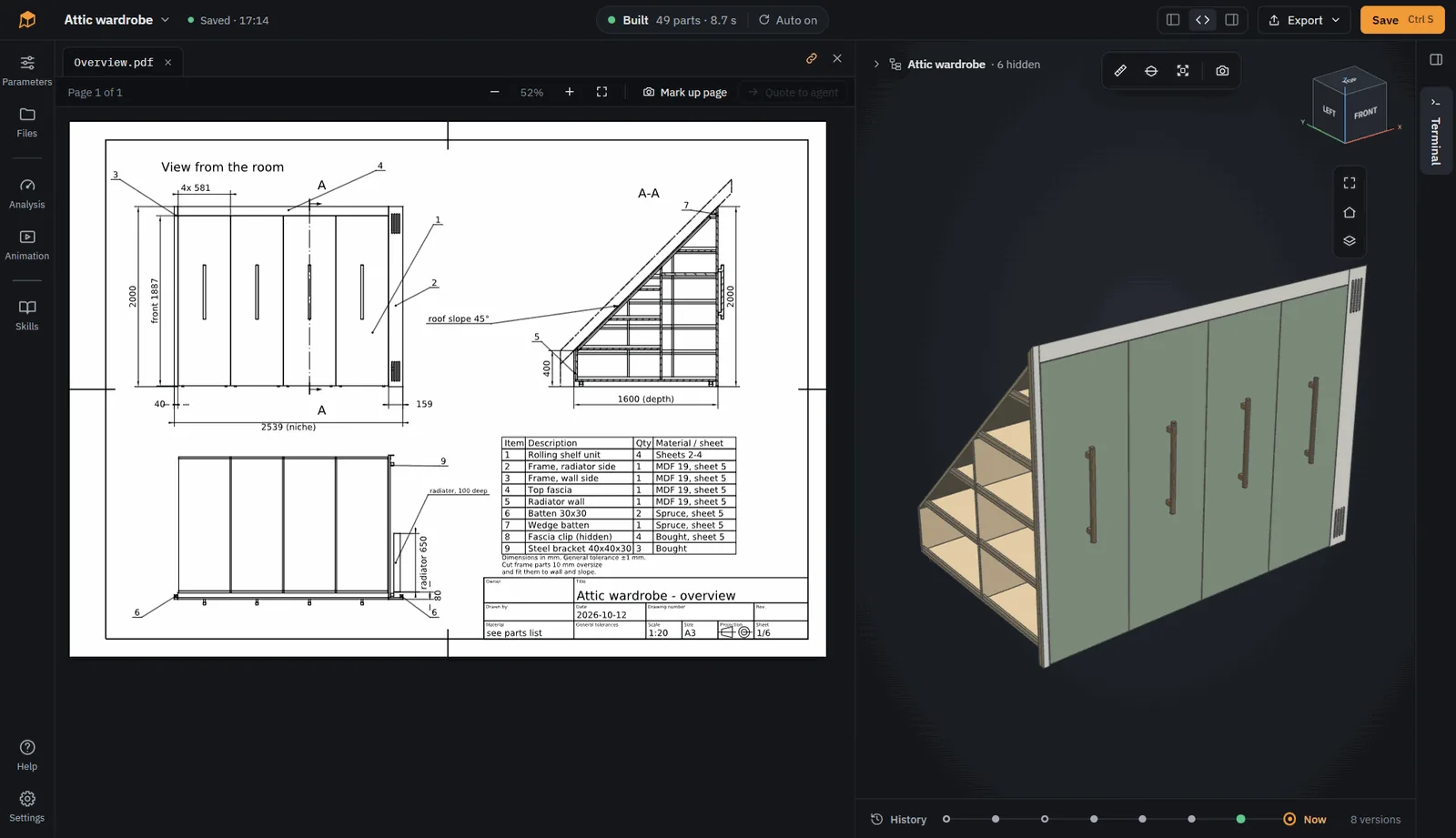
Technical drawings with views, sections and dimensions as PDF and DXF. Export STEP, STL, 3MF and more, or the whole model as a plain CadQuery script.
Click New model on the start page. It begins with a small example: a box with a lid.
Use the + above the terminal. SOMA lists the CLI agents it found on your computer.
For example “A case for a Raspberry Pi 5 with vents in the lid, printed in PETG.” SOMA builds every change.
Measure, point at what is wrong, and let the agent fix it. Then export STL, 3MF or STEP.
SOMA is not an agent of its own. Any CLI agent that can read files and run commands works. You install and sign in yourself, so your subscription, model and permission settings stay yours.
SOMA is an early prototype, developed in the open. Bug reports, ideas and experiences with different agents are welcome as issues.
GitHub 446SOMA (Solid Object Modeling with Agents) is a free, open-source desktop CAD app where your AI coding agent does the CAD. You describe a part, an agent such as Claude Code, Codex CLI, OpenCode or Gemini CLI writes it as a parametric CadQuery model in Python, and SOMA builds it, shows it in 3D and exports STEP, STL and 3MF.
Yes. Coding agents are good at writing CadQuery, a Python library for parametric CAD. What they lack is a way to see the result. SOMA adds that: it rebuilds the model on every change, shows it in a 3D viewer, and gives the agent rules, skills and a command line tool to build, check, measure and export the model. You point at what is wrong and the agent fixes the code.
No. SOMA works with the CLI agent you already use, such as Claude Code, Codex CLI, OpenCode or Gemini CLI. Any agent that runs in a terminal and can read files and run commands works. You install and sign in to it yourself, so your subscription, model choice and permission settings stay yours.
Yes. Instead of an agent in SOMA's terminal you can use a desktop agent app that works on a local folder and can run commands, for example Claude Code in Claude Desktop or the Codex app. Open the model in SOMA, choose Copy path for agent app under the + above the terminal, and open that path as the project folder in the agent app. SOMA keeps building and showing the model while the app's agent changes the code. A plain chat without file access and commands does not work.
Yes. SOMA is open source under the GPL-3.0. An additional permission, the SOMA Model Exception, makes sure that the models you design and the files you export belong to you, to use and share on terms of your choice, including commercial and proprietary use.
SOMA is an open-source way to do text-to-CAD. It runs on your own computer and works with the coding agent and AI subscription you already have. The result is parametric CadQuery code in a folder of yours, with exact solid geometry that exports to STEP. You can change the model in conversation with the agent, by adjusting parameters, or by editing the code yourself.
Both describe models as code. SOMA uses CadQuery, which is built on the OpenCascade kernel: models are exact solids with real faces and edges, so you get fillets, chamfers, accurate measurements and STEP export for other CAD programs. And in SOMA you usually do not write the code yourself, the agent does.
STL and 3MF for 3D printing, STEP and IGES for other CAD programs, DXF and SVG for 2D and laser cutting, and technical drawings as PDF and DXF. A model can also be exported as a plain CadQuery script that runs without SOMA, or as a ZIP with code, results and history.
Yes. SOMA opens plain CadQuery scripts, including scripts written for CQ-editor (show_object) or VS Code with ocp_vscode, and can work directly in a folder or Git repository of yours.
Mostly mechanical parts: cases and enclosures for electronics, brackets, mounts, organizers, furniture and machine frames. SOMA has instructions for 3D printing, CNC, sheet metal and standard parts such as screws and nuts, checks parts for printing, computes strength with finite elements (CalculiX), animates mechanisms and makes technical drawings.
Windows 10 or newer (x64), macOS on Apple Silicon, and Linux x64 with glibc 2.31 or newer. Python, CadQuery, Git and CalculiX are included, so nothing else is needed except a CLI agent.
SOMA itself runs locally and sends nothing by itself; it only checks GitHub for new versions, which can be turned off. Your coding agent sends what it reads to its provider, under your own account and settings.
New to AI and CAD? Read how to use AI for CAD, a guide to the different ways and how to get good results.